
AI can build the pipeline. It cannot invent what your data means.
Your data's meaning,
in one governed place.
DeltaVault holds what your data means: the glossary, the governance, the business model and the mappings, in one governed record. Generation reads that record, so the pipeline that comes out is the one the business meant.
There is a free edition: the business modeling half of DeltaVault, built to run on your own AI key. Access is by invitation while the first customers onboard. How the editions differ
One business term travelling from business meaning, through the governed model, into generated code
Three sheets side by side. The first is the business entity Customer with its definition, owner, steward and the attribute Customer ID marked as the business key. The second is the governed model, where the source column CustomerID is matched to Customer ID with a confidence score, feeds the hub column customer_id, and is bound to the hub template by a binding rule. The third is the generated Databricks code, where the customer_id column appears in the create-table statement. Arrows connect the sheets left to right.
The bottleneck moved.
Generating a pipeline used to be the hard part. Now AI does it in minutes. The hard part is everything AI cannot know: what your business means, which rules govern it, and how your concepts map to real data. Today that lives in three places, and none of them is a system.
One place for what your data means.
Five steps, one record. Each step below is the product as it is today, not a diagram of it.
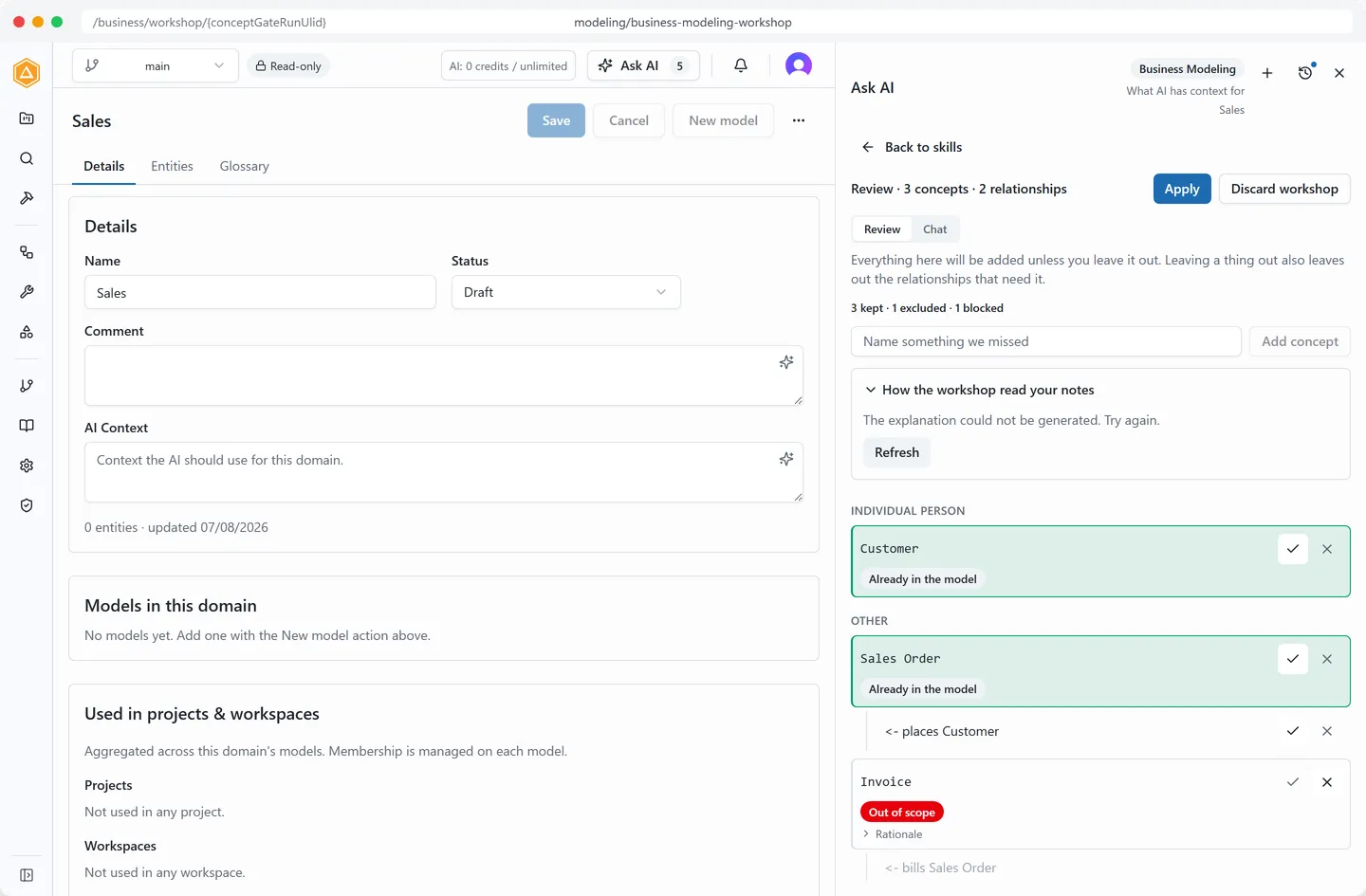
Capture the business in its own words.
Describe the business in plain language, or attach a document the workshop reads for that one run and never stores, and it proposes concepts and relationships onto the diagram. You accept them one at a time; nothing lands in the model until you say so.
Three depth settings: Quick pass, Balanced, Thorough.
Every proposed node carries its reason.
Voice dictation is transcribed in the browser; nothing is recorded or sent.
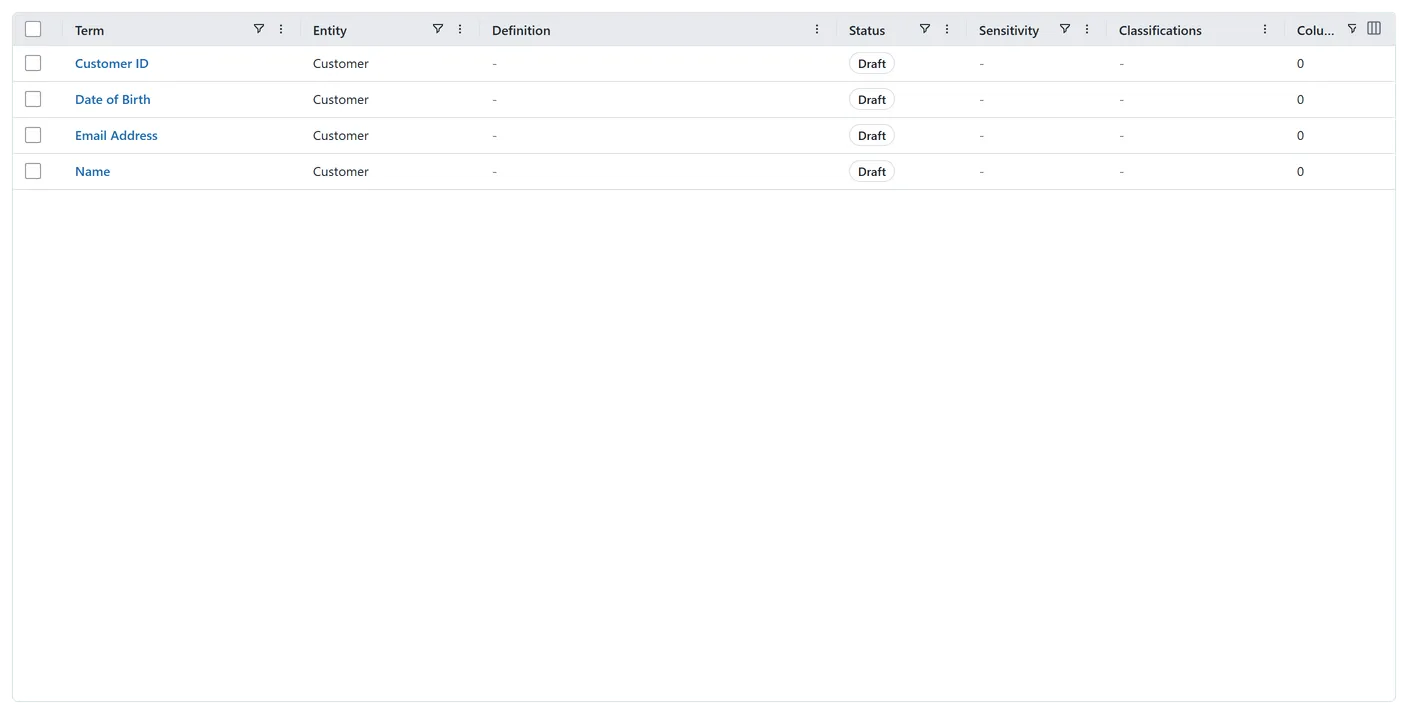
Govern the meaning once.
Owner, steward, retention and an approved definition live on the business entity, and its attributes inherit them. Classification set on an attribute reaches every column mapped to it, and four gates can hold a build, an approval, a mapping or an import until the governance is there.
Three classification schemes ship by default.
Six validation rule packs run at commit; a blocking rule stops the commit until someone acknowledges it.
Databricks tables get Unity Catalog column tags from the same record.
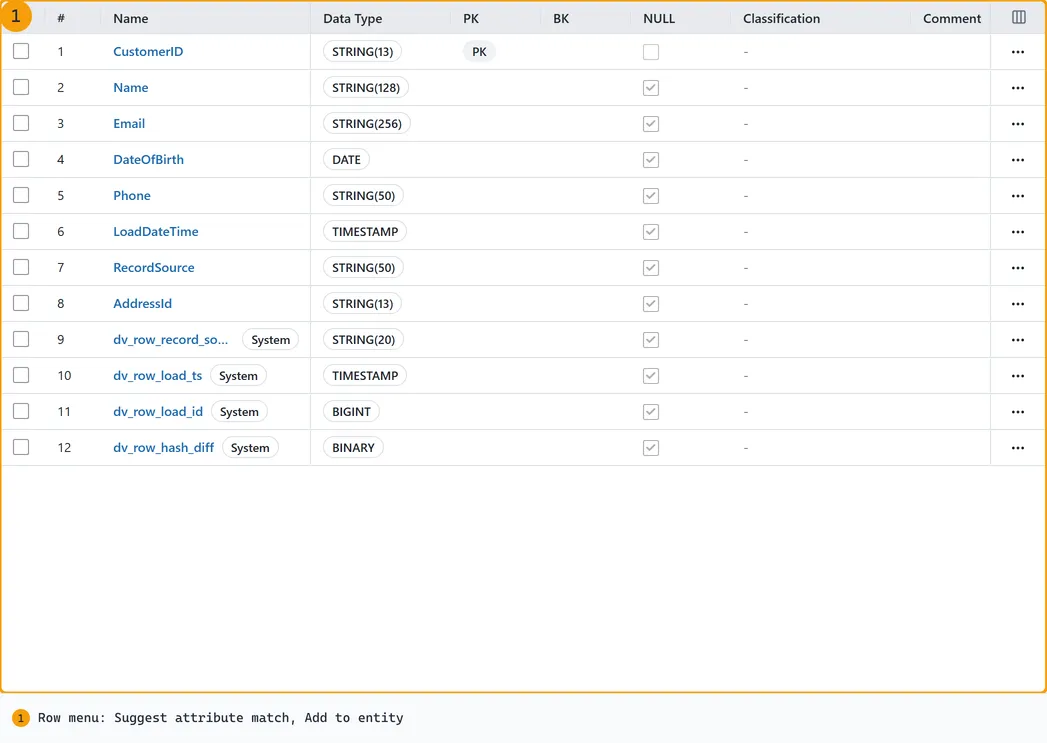
Map sources to meaning, with a reason for every match.
Map and Match suggests an entity for every table you select, then an attribute for every column, each with a confidence score and a written rationale, and nothing changes until you accept it. Accept a match and the attribute's classification reaches the column. Column mappings, which imports populate for you, give you column-level lineage across the whole pipeline.
Lineage traced across every hop, bounded at 500 tables a graph.
Impact analysis before you change a column.
One YAML file per column, committed to your GitHub repository.
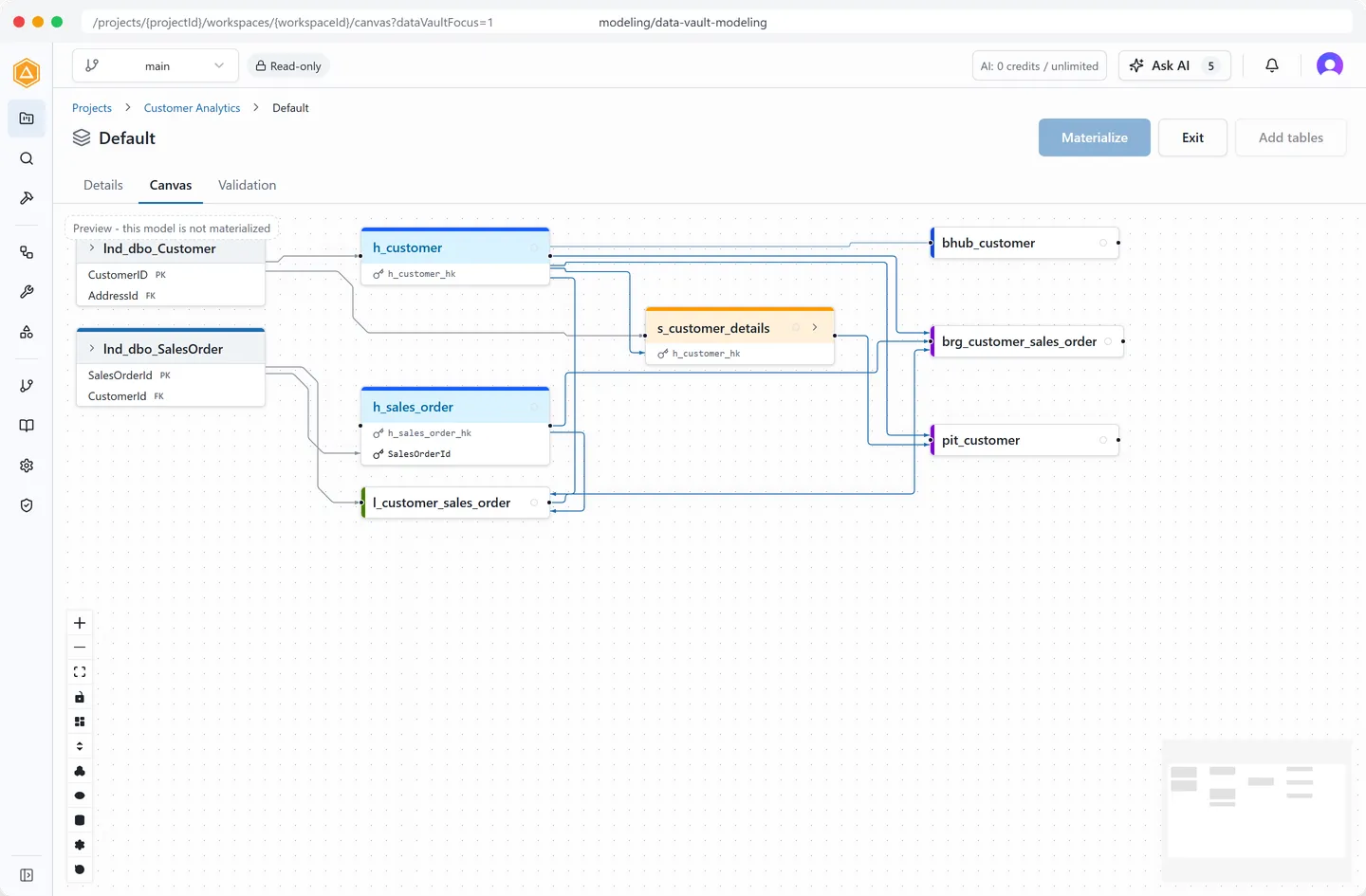
Model the vault from the model, not by hand.
The Data Vault accelerator reads the metadata the catalog already holds and decomposes a staging table into hubs, links and satellites, deterministically, honoring the overrides you made last time. Refine on the canvas, read the diff, then materialize into real tables, columns and mappings.
Business vault, point in time and bridge tables derive from the raw vault.
Point in time cadence: hourly, daily, weekly or monthly.
One designated business key per staging table, hash expression previewed before you save.
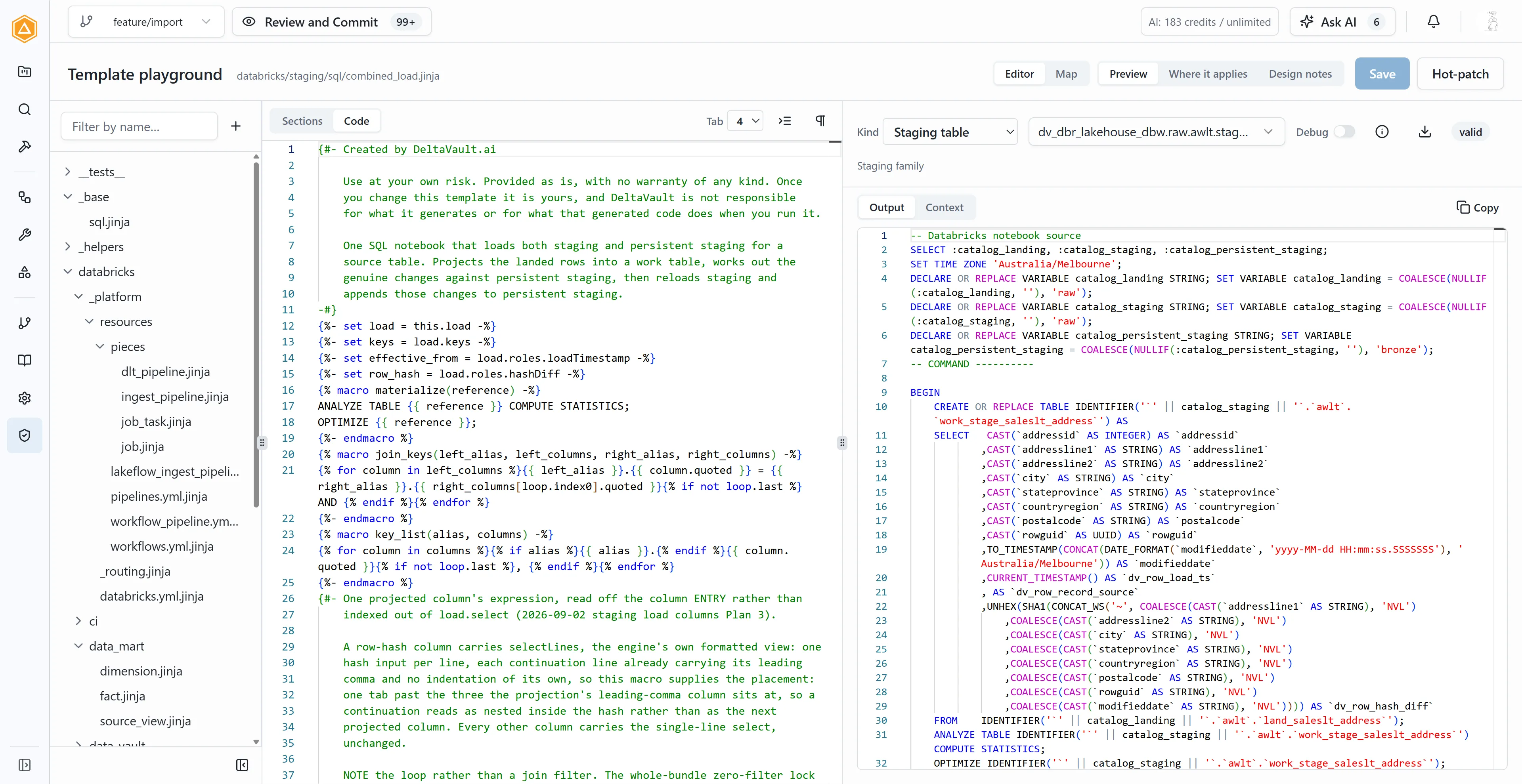
Generate the code, and own the template that made it.
Binding rules pick a Jinja template for every table, and the Preview tab renders the create-table, load and test code live, naming the rule that matched. One Build renders the whole Databricks Lakeflow Asset Bundle as an immutable snapshot. You review it, commit it, and your own continuous integration deploys it; DeltaVault never pushes to your workspace.
Eleven output kinds, matched on up to five dimensions.
36 default macros for cleansing, masking and Data Vault keys.
Five data test types, declared once, inherited by every load that reads the table.
Two ways in. They meet at a mapping.
Some teams know what the business means and have not touched a source yet. Others have four hundred tables and no glossary. DeltaVault takes either as the starting point, and the other team's work attaches when it arrives.
Start from the business
- Run the modeling workshop on your stories, your requirements or a document it reads for that one run.
- Review the proposal and accept concepts and relationships one at a time.
- Approve the definitions, assign owners and stewards, classify the attributes.
- Match sources to the model as they arrive, each match scored and explained.
Start from the data
- Connect SQL Server, Azure SQL Database or Amazon Relational Database Service for SQL Server through a local agent that makes outbound calls only, or run one query against your source and upload the export.
- Discover in two passes: list a 2,000-object database in seconds, then pull full metadata for just your selection.
- Review the import grid, every row marked added, changed, removed or unchanged, and commit all or nothing on a branch.
- Let Map and Match propose the entities your tables imply. Accepting one creates a skeleton entity that carries governance from that day.
Whichever end you start from, the two paths meet at a worked, reviewed mapping, and the sequencing argument goes away.
Not documentation. Generation.
Your glossary and rules do not sit on a shelf. DeltaVault hands them to templates and renders working pipelines for your platform. The templates are yours: override one section of a shipped template or bind your own, and upstream improvements keep flowing. Change the template and watch the code change.
{% import "_helpers/databricks_vault_sql.jinja" as vault %} -- {{ object.kindLabel }}: {{ object.name }} MERGE INTO {{ object.ref }} AS target USING ( SELECT {% for column in object.load.columns %}{{ "\t\t\t\t," if not loop.first }}{{ column.select }} AS {{ column.quoted }} {% endfor %} FROM {{ object.source.ref }} AS source GROUP BY {% for column in object.load.groupBy %}{{ "\t\t\t\t," if not loop.first }}source.{{ column.sourceColumnQuoted }} {% endfor %} ) AS batch ON target.{{ object.load.keyColumn.quoted }} = batch.{{ object.load.keyColumn.quoted }} WHEN NOT MATCHED THEN INSERT ({{ vault.column_list(object.load.insert, tabs=4) }}) VALUES ({{ vault.column_list(object.load.insert, "batch", tabs=4) }});{%- if options.analyze -%}ANALYZE TABLE {{ reference }} COMPUTE STATISTICS;{%- endif -%}{%- if options.optimize -%}{{ "\n" if options.analyze }}OPTIMIZE {{ reference }};{%- endif -%}
-- Hub: Customer MERGE INTO raw.dbo.h_customer AS target USING ( SELECT `hash_key` AS `h_customer_hk` ,`CustomerID` AS `customer_id` ,MIN(`dv_load_date`) AS `dv_load_date` ,MIN(`dv_record_source`) AS `dv_record_source` ,CAST(row_audit_id AS BIGINT) AS `audit_id` FROM staging.dbo.lnd_dbo_Customer AS source GROUP BY source.`hash_key` ,source.`CustomerID` ) AS batch ON target.`h_customer_hk` = batch.`h_customer_hk` WHEN NOT MATCHED THEN INSERT (`h_customer_hk` ,`customer_id` ,`dv_load_date` ,`dv_record_source` ,`audit_id`) VALUES (batch.`h_customer_hk` ,batch.`customer_id` ,batch.`dv_load_date` ,batch.`dv_record_source` ,batch.`audit_id`); ANALYZE TABLE raw.dbo.h_customer COMPUTE STATISTICS; OPTIMIZE raw.dbo.h_customer;
What we are finding important.
The blog is where the thinking happens before it lands in the product: Data Vault on a lakehouse, medallion drift, and where AI belongs in modeling. New here? Start with the introduction.
See what your data means,
on your own sources.
Request a demo and we walk through your model with you, from the first entity to the generated bundle. Or subscribe and get the next post when it lands.