
Manage data types
DeltaVault describes every column with one of 23 canonical data types, a deliberately small vocabulary that works across Snowflake, Databricks, and Microsoft Fabric:
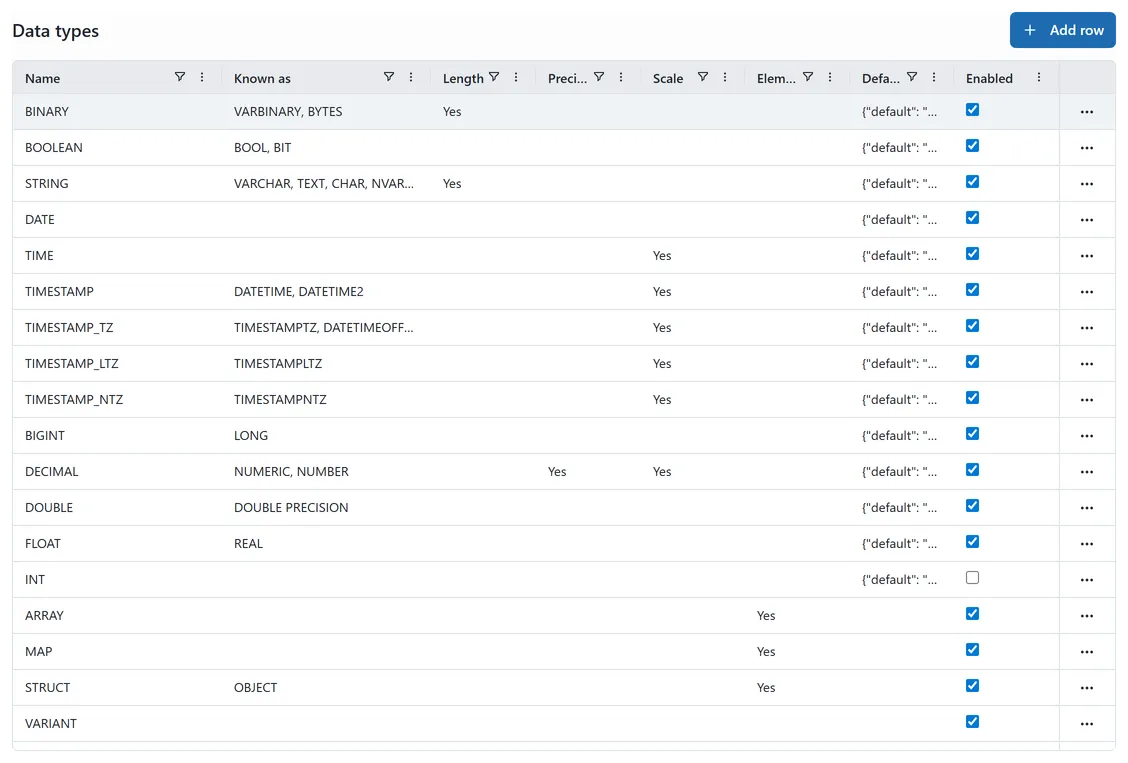 The Data types grid: canonical type names, Known as aliases, and enabled state.
ARRAY, BIGINT, BINARY, BOOLEAN, DATE, DECIMAL, DOUBLE, FLOAT,
GEOGRAPHY, GEOMETRY, INTEGER, MAP, STRING, STRUCT, TIME, TIMESTAMP,
TIMESTAMP_LTZ, TIMESTAMP_NTZ, TIMESTAMP_TZ, UNKNOWN, UUID, VARIANT, VECTOR.
Platform admins manage the catalog under Admin → Internal types → Data types.
”Known as” aliases
Section titled “”Known as” aliases”Each type can carry aliases: the names data engineers actually type. INTEGER is
known as INT, SMALLINT, TINYINT, and BYTEINT; STRING is known as VARCHAR,
TEXT, CHAR, and NVARCHAR; UUID is known as GUID and UNIQUEIDENTIFIER.
Aliases power search and documentation only:
- The column type picker matches them: type
varcharand pickSTRING. See Choose column data types. - The Data types grid shows them in the Known as column.
They never change how imports behave (see below).
- Aliases are stored uppercase; the editor accepts any case and normalizes on save.
- Names and aliases are unique across the whole catalog: no alias may repeat another type’s name or aliases. Conflicting saves are rejected with the conflicting type named.
- Aliases on the built-in types are curated by DeltaVault and reset to the curated set when the app restarts. Aliases on types you add yourself are preserved.
Imports don’t read aliases
Section titled “Imports don’t read aliases”Inbound metadata (CSV/SQL import, discovery) maps source-system types onto the catalog
through per-dialect dialect type mappings: tinyint from SQL Server normalizes to
INTEGER, datetimeoffset to TIMESTAMP_TZ, and so on. A global alias can’t carry
per-dialect meaning (Snowflake’s FLOAT is 8 bytes, Spark’s is 4), so the mapping
table stays the only authority for import normalization. The original source spelling
is always preserved on the column as its source type.