
Classification settings
Classification schemes are organization-wide. You manage them under Settings → Conventions (/admin/settings?section=conventions), in the Classifications block. The block shows one tab per scheme, and editing is admin-only. DeltaVault ships three schemes as platform defaults, and most teams run them as-is for a long time before changing anything.
Note: Classifications is a single organization-wide setting; there is no separate project or workspace copy.
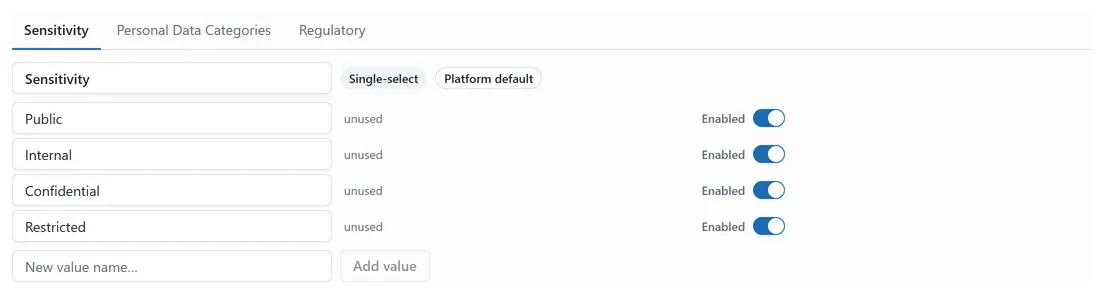 The Classifications block under Settings → Conventions: one tab per scheme, with the open scheme’s values, reference counts, and enabled toggles.
The three platform schemes
Section titled “The three platform schemes”- Sensitivity, single-select: Public, Internal, Confidential, Restricted.
- Personal Data Categories, multi-select: Contact, Identifier, Financial, Health, Biometric, Behavioral.
- Regulatory, multi-select: GDPR, HIPAA, CCPA, Sarbanes-Oxley.
A badge beside each scheme’s name tells you whether it’s Single-select or Multi-select, and a Platform default badge marks the schemes you haven’t customized.
Editing schemes and values
Section titled “Editing schemes and values”Rename a scheme by typing in its name field. Rename a value the same way. To add a value, type a name into New value name… and click Add value; DeltaVault derives the stored key from the name. A Save button appears once you’ve made a change, and nothing is written until you click it. A dot on the scheme’s tab marks unsaved changes, and switching tabs never discards an edit in progress.
You don’t delete values. You disable them. Each value has an Enabled switch. Turning it off keeps the value on record, so historical assignments still resolve, but removes it from the pickers on entity and attribute forms.
The disable guard
Section titled “The disable guard”Next to every value is a live reference count: “3 references”, or “unused”. A value that’s still referenced can’t be disabled: its switch is locked until nothing uses it. That stops you from pulling a classification out from under the entities and columns that depend on it. To retire a value in use, reclassify whatever references it first, watch the count fall to “unused”, then flip the switch.
Your organization’s own copy
Section titled “Your organization’s own copy”The platform defaults belong to DeltaVault, not your organization, until you edit one. The first time you save a change to a default scheme, your organization gets its own copy that overrides the default from then on. The Platform default badge is your signal for which schemes are still untouched.
Where changes surface
Section titled “Where changes surface”A scheme change ripples everywhere governance is read:
- Sensitivity tints and badges on the modeling board.
- The classifications column in the Glossary.
- The classification chips in the Map & Match accept dialog.
Rename a value and the new name shows up in all of them on the next read. Disable one and it stops appearing as a choice. See Data governance overview for how classifications attach to your model, and Manage data types for the sibling settings surface.